


YITH WooCommerce Quick Export Premium GPL
$4.49
YITH WooCommerce Quick Export Premium is a WooCommerce plugin that exports your shop data — products, orders and customers — into a CSV file.
YITH WooCommerce Quick Export Premium is a WooCommerce plugin that exports your shop data — products, orders and customers — into a CSV file. It adds a dedicated Data Exportation panel where you choose what to export, set a filename format, and schedule export jobs that run at a specific date and time. The build sold here is version 1.3.5, a 1.4 MB zip, and it runs on WordPress 5.3 or newer.
| Product | YITH WooCommerce Quick Export Premium |
|---|---|
| Version | 1.3.5 |
| Works with | WordPress 5.3+ / PHP 8.x+ |
| Tested up to | WordPress 5.6 |
| License | GPLv2 or later |
| Delivery | Instant ZIP download, 10 downloads, 365 days |
What data can you send to a CSV file
The plugin's export panel asks you to choose the data to export before a job runs. Product, order and customer data are the three groups the plugin works with, and each export is written to a CSV file you can open in a spreadsheet or import into another system.
Order exports gained a useful detail in version 1.3.3: the quantity of purchased products is included in the orders export. That means an order line in your CSV can show how many units of a product the customer bought, not just that the product appeared on the order.
Scheduled export jobs and the date filters
Under Scheduled exportation you create a new scheduled job, give it an exportation job name, and choose when the exportation should start. The interface offers a starting date and an ending date, and both can be left blank: leave the start blank to begin from the first item found, leave the end blank to finish with the last item found.
The plugin validates those dates. It warns that the starting date must be earlier than the ending date, and in another check that it must be earlier than or the same as the ending date. A separate message covers an invalid schedule time, so a job cannot be saved with a malformed time value. The Scheduled task list and Processed task list screens show the jobs you have created and the ones already run, and Schedule history keeps a record.
Filenames, Dropbox backups and where exports go
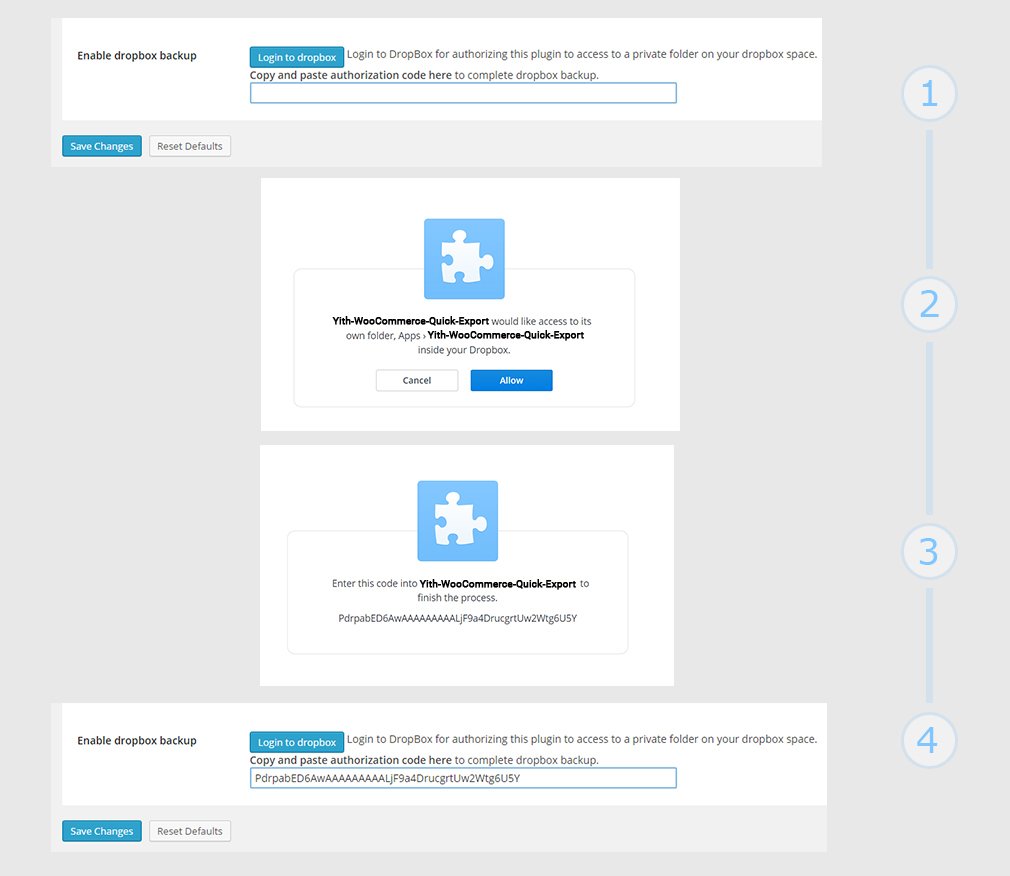
A Filename format setting lets you control how the exported file is named, so a run of exports does not produce a pile of identically named files. The settings also include a Send documents to Dropbox option, described as setting automatic document backup to Dropbox; connecting it starts with a Get new Access Token button.
Folder and path fields are validated too — the plugin asks for a valid folder/path name before it accepts the value. General Settings holds the remaining configuration, and the export screen itself is titled Data Exportation.
Compatibility, framework and the 1.3.5 release
Version 1.3.5, released on 11 February 2021, adds support for WooCommerce 5.0 and updates the YITH plugin framework. It also fixes the start and end date filters, and removes the PCLZIP class from the plugin so it uses the one bundled with WordPress instead.
The plugin requires WordPress 5.3 and is tested up to WordPress 5.6. Earlier releases in the 1.3.x line tracked WooCommerce versions 4.6 through 4.9 and added WordPress 5.6 support in 1.3.2. The zip contains the main plugin folder alongside plugin-fw, lib, plugin-upgrade, templates and plugin-options.
What this build includes
| CSV export of shop data | Choose product, order or customer data and export it to a CSV file from the Data Exportation panel. |
|---|---|
| Purchased quantity in order exports | Order exports include the quantity of purchased products for each line, added in version 1.3.3. |
| Scheduled exportation | Create a scheduled job with its own name and a start date and time, then track it in the Scheduled task list. |
| Open-ended date ranges | Leave the starting date blank to begin from the first item found, or the ending date blank to stop at the last item. |
| Date and time validation | The plugin checks that the starting date is earlier than the ending date and that the schedule time is valid before saving. |
| Filename format setting | Set the filename format used for exported documents so each export file carries a name you control. |
| Dropbox document backup | Enable Send documents to Dropbox to back up exported documents automatically, connecting with a new access token. |
| Schedule history | A Schedule history screen and a Processed task list keep a record of export jobs that have run. |
Installing it on a WordPress site
- Upload the downloaded plugin zip through the WordPress dashboard under Plugins, then activate YITH WooCommerce Quick Export Premium.
- Open the plugin's General Settings and set your filename format and, if you want automatic backups, the Dropbox option with a new access token.
- Go to Data Exportation, choose the data to export, and either run an export or create a scheduled job with a name, start date and optional end date.
Latest changes
Version 1.3.5, released on 11 February 2021, adds WooCommerce 5.0 support, updates the YITH plugin framework, fixes the start and end date filters, and switches to the PCLZIP class bundled with WordPress.
Frequently asked questions
What does YITH WooCommerce Quick Export Premium do?
It exports product, order and customer data from your WooCommerce store to a CSV file. You pick the data group in the Data Exportation panel, optionally set a filename format, and can run the export on a schedule with a start date and time instead of doing it by hand each time.
Can I schedule exports to run automatically?
Yes. The Scheduled exportation section lets you create a new scheduled job with an exportation job name and a chosen start date and time. Jobs appear in the Scheduled task list, completed runs in the Processed task list, and the Schedule history screen keeps the record.
Does the order export include product quantities?
It does. Version 1.3.3 added the quantity of purchased products to the orders export, so each order entry in the CSV can carry the number of units bought alongside the product details.
Which WooCommerce and WordPress versions are supported?
The plugin requires WordPress 5.3 and is tested up to WordPress 5.6. Version 1.3.5 adds support for WooCommerce 5.0, and the 1.3.x releases before it covered WooCommerce 4.6 through 4.9.
How is this build licensed and supported?
You get the same plugin files the developer ships, under the GPL, for $4.49. There is no vendor update channel and no vendor support desk with this build; updates and help come from wherever you obtained it.
What the GPL build means for you
This is the same archive the developer publishes, redistributed under the GNU General Public License: you get the working files for $4.49 with no vendor update channel and no vendor support desk. If you need automatic updates or a support contract, buy the official license from the developer.
| This GPL build | Official license | |
|---|---|---|
| Price | $4.49 one time | Vendor subscription |
| Automatic updates | No | Yes |
| Developer support | No | Yes |
| Number of sites | Unlimited | Depends on plan |
Browse the rest of the WordPress plugins category or the full shop. The licence text is at GNU GPL v2, and general documentation is at WordPress.org.
You must be logged in to post a review.
You may also like…

Related products









Reviews
Clear filtersThere are no reviews yet.