



User Role Editor Pro GPL
$4.49
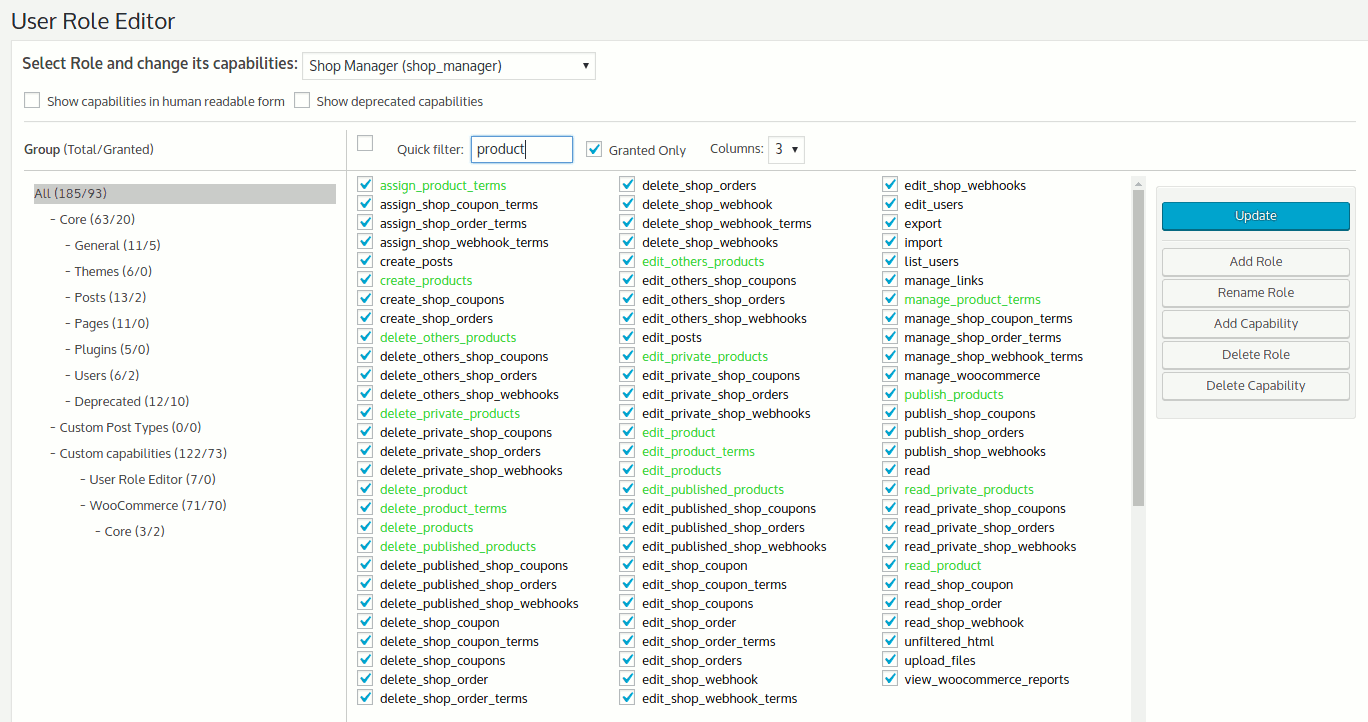
User Role Editor Pro is a WordPress plugin for changing user roles and capabilities. You turn on the check boxes of the capabilities you want a role to have and click Update to save.
User Role Editor Pro is a WordPress plugin for changing user roles and capabilities. You turn on the check boxes of the capabilities you want a role to have and click Update to save. From the same interface you can create new roles, copy an existing role as a starting point, delete roles that no user holds, and assign capabilities to individual users.
| Product | User Role Editor Pro |
|---|---|
| Version | 4.67.1 |
| Works with | WordPress 4.7+ / PHP 8.2+ |
| Tested up to | WordPress 7.2 |
| License | GPLv2 or later |
| Delivery | Instant ZIP download, 10 downloads, 365 days |
How capability editing works in User Role Editor Pro
The plugin lists the capabilities attached to a selected role. You tick the boxes for the capabilities you want to add and clear the boxes for the ones you want to remove, then press Update. The screen confirms the result with messages such as "Role is updated successfully" or "User capabilities are updated successfully".
Capabilities can also be assigned on a per-user basis, separate from the role, and a single user can hold multiple roles at the same time. On a multisite network the plugin states that roles can be updated for all network sites, and a separate message covers the single-site method.
Creating, copying and deleting WordPress roles
New roles can be built from scratch or created as a copy of an existing role, then adjusted capability by capability. A role you made yourself can be deleted only when no users are assigned to it; otherwise the plugin refuses with "You can not delete role".
The role that every newly created user receives by default can be changed as well. The plugin will not set Administrator as that default role and will not accept an empty value, returning "Wrong request. Default role can not be empty" or "Can not set Administrator role as a default one".
Custom capabilities and leftovers from uninstalled plugins
You can add new capabilities of your own and remove capabilities that remain after a plugin has been uninstalled. The interface reports the outcome, for example that capabilities were removed successfully, and shows a notice when there are no capabilities available for deletion.
Custom Post Types appear in the plugin's settings screens, so capabilities tied to those post types are part of the same editing workflow.
Multisite behaviour and the Other Roles add-on
Multi-site support is provided. On a network installation the options page sits under the Network Admin Settings menu, and role updates can be applied across the network.
The Other Roles add-on enforces an administrator exclusion end to end: the dialog does not render the administrator row, and the rule is re-enforced server-side in URE_Other_Roles_Access::blocking_needed(), so neither a crafted POST request nor a custom filter value can lift the administrators block behind edit_users and delete_users.
Security fix in version 4.67.1
Version 4.67.1 closes a path where a user holding the promote_users capability could assign themselves or others roles with capabilities beyond their own by crafting a POST request to their own profile page. The self-assignment guard and critical-capability check added in 4.67 for the Users page role-assignment actions now apply to the profile_update path as well.
The fix is credited to Ahmed Mahmoud (Haktrak Networks) and Brandlion Cyber for responsible disclosure.
What this build includes
| Check-box capability editing | Turn capabilities on or off for a selected role with check boxes and save the change with the Update button. |
|---|---|
| Roles built from scratch or copied | Create a new role and set its capabilities yourself, or start from a copy of an existing role and adjust it. |
| Role deletion guard | Delete a self-made role only when no user is assigned to it; the plugin blocks deletion otherwise. |
| Default role for new users | Change the role that every newly created user receives by default, with Administrator excluded as a choice. |
| Per-user capabilities | Assign capabilities to an individual user rather than only through their role. |
| Multiple roles per user | Give one user several roles at the same time instead of a single role only. |
| Custom capability management | Add new capabilities of your own and remove capabilities left behind by uninstalled plugins. |
| Multisite role updates | Apply role changes across a WordPress multisite network, with options under Network Admin Settings. |
| Custom Post Types in settings | Custom Post Types are listed in the plugin's settings screens alongside the standard capability groups. |
Installing it on a WordPress site
- Deactivate the plugin if a previous version is installed; if the free User Role Editor is active, deactivate it and remove it, because the Pro package includes its own copy of the free core.
- Extract the archive contents to the /wp-content/plugins/user-role-editor-pro directory.
- Activate User Role Editor Pro from the Plugins menu, then open Settings > User Role Editor to adjust options (Network Admin Settings on multisite) and Users > User Role Editor to change roles and capabilities.
Latest changes
Version 4.67.1 extends the role-assignment guard and critical-capability check to the profile_update path and hardens the administrator exclusion in the Other Roles add-on.
Frequently asked questions
Do I need the free User Role Editor installed as well?
No. The Pro package includes its own copy of the free version core, so you should deactivate the free version and can remove it before installing Pro. Both versions should not be active at the same time.
Can I give one user more than one role?
Yes. Multiple roles can be assigned to a user simultaneously, and capabilities can also be assigned on a per-user basis independently of the role.
What happens if I try to delete a role that is still in use?
The plugin refuses the deletion and shows the message "You can not delete role". A self-made role can be deleted once no users are assigned to it.
Does it work on a WordPress multisite network?
Multi-site support is provided. The options page is located under the Network Admin Settings menu, and role changes can be applied for all network sites.
What are the server requirements?
The plugin requires WordPress 4.7 and PHP 8.2, and is tested up to WordPress 7.2.
What does the $4.49 GPL build include?
You get the same plugin files the developer ships, at $4.49. There is no vendor update channel and no vendor support desk with this build.
What the GPL build means for you
This is the same archive the developer publishes, redistributed under the GNU General Public License: you get the working files for $4.49 with no vendor update channel and no vendor support desk. If you need automatic updates or a support contract, buy the official license from the developer.
| This GPL build | Official license | |
|---|---|---|
| Price | $4.49 one time | Vendor subscription |
| Automatic updates | No | Yes |
| Developer support | No | Yes |
| Number of sites | Unlimited | Depends on plan |
Browse the rest of the WordPress plugins category or the full shop. The licence text is at GNU GPL v2, and general documentation is at WordPress.org.
You must be logged in to post a review.
You may also like…

Related products









Reviews
Clear filtersThere are no reviews yet.