


Wpmu Dev Appointments Plus GPL
$4.49
WPMU DEV Appointments Plus is a WordPress plugin that lets you manage appointments and bookings directly from your website.
WPMU DEV Appointments Plus is a WordPress plugin that lets you manage appointments and bookings directly from your website. It is aimed at studios, salons and clinics that want visitors to book online while administrative tasks stay in one place. Services, service providers and schedules are configured inside WordPress, and the plugin works with WooCommerce and Elementor.
| Product | wpmu-dev-appointments-plus |
|---|---|
| Version | 2.4.2 |
| Works with | WordPress 6.x+ / PHP 8.x+ |
| Tested up to | WordPress current |
| License | GPLv2 or later |
| Delivery | Instant ZIP download, 10 downloads, 365 days |
Which businesses can take bookings with Appointments Plus?
The plugin is built for appointment-based businesses such as studios, salons and clinics. Customers book through forms on your site instead of back-and-forth messages, which improves the customer experience and streamlines administrative tasks.
You define your services and the people who deliver them in the plugin settings. Question fields, time base and schedule display are all configurable, so the booking form matches how your business actually runs.
How does Appointments Plus work with WooCommerce and Elementor?
Appointments Plus is designed to work with WooCommerce, so you can manage appointments alongside your online store rather than in a separate system. Booking forms can also be placed into pages built with Elementor.
The plugin ships shortcodes and widgets. Services and service providers each have their own shortcodes, and you can place them on any page you wish. Schedule views can show more than two weeks or months on the same page.
What can you configure in the settings screens?
Settings cover time base, service capacity, confirmation of appointments, the start day of the week and date and time formats. You can confirm appointments manually and enter a manual appointment from the admin side.
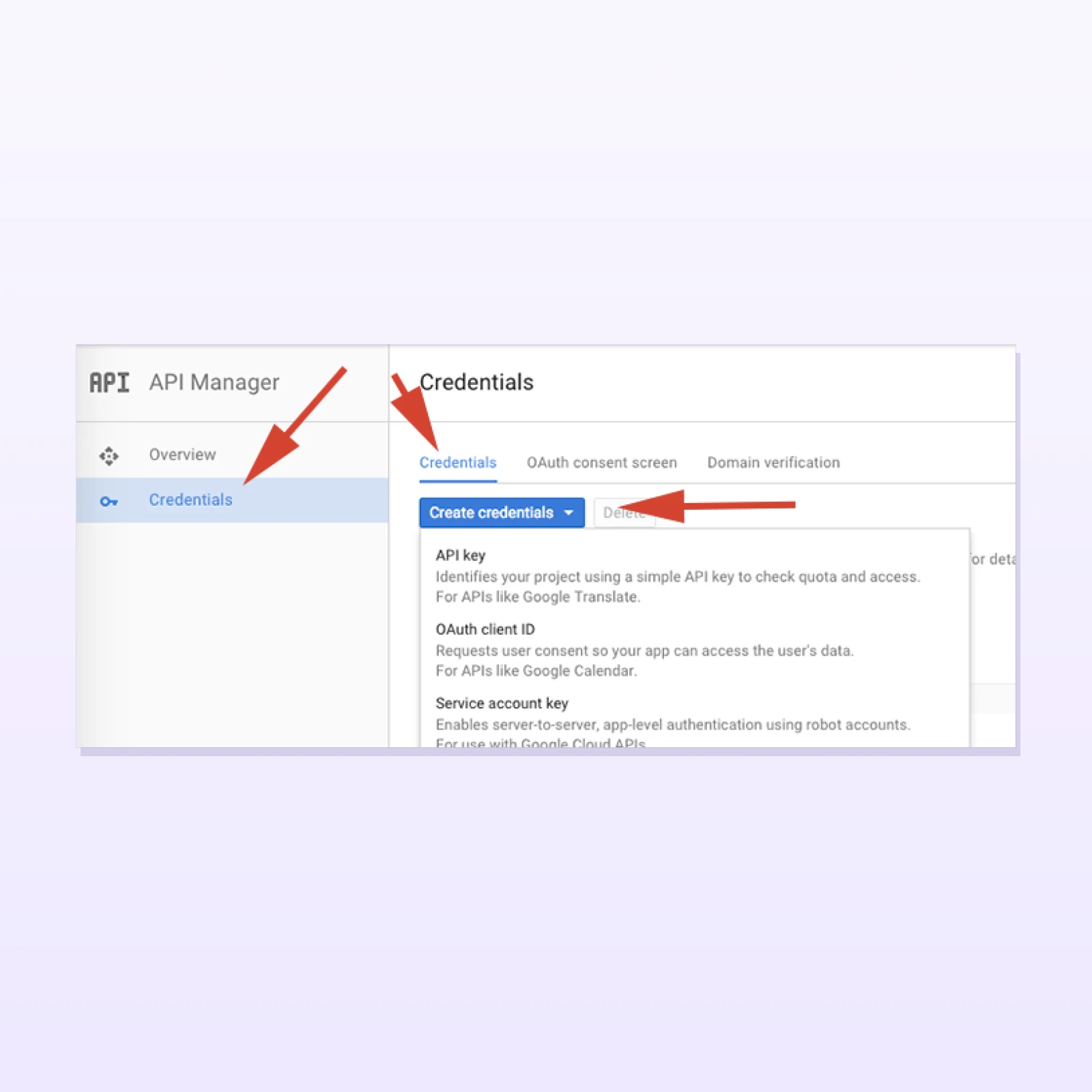
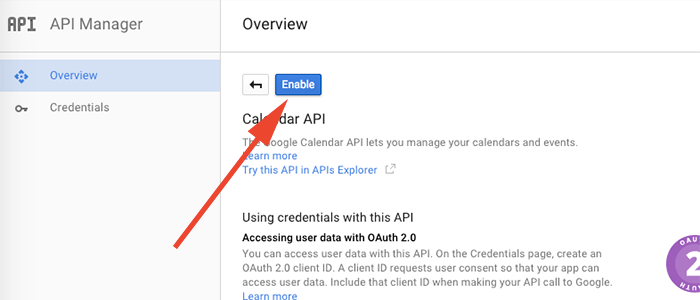
Appointment records can be permanently deleted when needed. A built-in cache is included, and a dummy service provider is available for setup and testing. Google Calendar settings are part of the configuration as well.
What this build includes
| Online appointment booking | Customers book appointments through forms on your WordPress site, keeping the booking process on your own pages. |
|---|---|
| WooCommerce integration | Manage appointments alongside your online store so bookings and shop orders live in the same WordPress install. |
| Elementor compatibility | Place booking forms into pages built with Elementor without leaving the page builder. |
| Services and service providers | Define the services you offer and the providers who deliver them, then display each through its own shortcode. |
| Manual appointment entry | Add an appointment from the admin side and confirm appointments manually when automatic confirmation is not what you want. |
| Service capacity control | Set what service capacity means for your business so a single slot can hold the right number of bookings. |
| Configurable time base and formats | Adjust the time base and set the start day of the week plus your preferred date and time formats. |
| Google Calendar settings | Configure Google Calendar from the plugin settings screen to connect your booking calendar. |
Installing it on a WordPress site
- Upload the plugin zip through your WordPress dashboard under Plugins > Add New, then activate it.
- Open the plugin settings and customize your booking options and forms according to your business needs.
- Add at least one service and define your service providers, then place the shortcodes or widgets on the pages where customers should book.
Latest changes
Version 2.4.2 is the current build available here.
Frequently asked questions
Do I need at least one service and one service provider?
The settings screens ask whether it is necessary to have at least one service and whether service providers must be defined. Both are part of the setup flow, so plan your service list and the people who deliver those services before you publish booking forms.
Can I use the shortcodes on any page?
Yes. Services and service providers each have shortcodes, and you can use them on any page as you wish. The plugin also provides widgets, and schedule views can show more than two weeks or months on the same page.
How are appointments confirmed?
Appointments can be confirmed through the plugin, and you can also confirm an appointment manually. The settings include the relevant options, so you decide how confirmation fits your workflow.
Does the built-in cache conflict with other caching plugins?
The plugin includes a built-in cache. Its settings screen explains what the built-in cache does and whether you can still use other caching plugins, so check that section before adding a separate caching layer to your site.
What is the dummy service provider for?
A dummy service provider is included, and the settings explain what it means and how to make use of it. It is useful while you set up services and schedules before real providers are assigned.
Is this the developer's own build and does it include support?
This is a GPL build: the same files the developer ships, priced at $4.49. It does not include a vendor update channel or vendor support desk. Version 2.4.2 is a 4.2 MB zip.
What the GPL build means for you
This is the same archive the developer publishes, redistributed under the GNU General Public License: you get the working files for $4.49 with no vendor update channel and no vendor support desk. If you need automatic updates or a support contract, buy the official license from the developer.
| This GPL build | Official license | |
|---|---|---|
| Price | $4.49 one time | Vendor subscription |
| Automatic updates | No | Yes |
| Developer support | No | Yes |
| Number of sites | Unlimited | Depends on plan |
Browse the rest of the WordPress plugins category or the full shop. The licence text is at GNU GPL v2, and general documentation is at WordPress.org.
You must be logged in to post a review.
You may also like…











Reviews
Clear filtersThere are no reviews yet.