

Force Sells for WooCommerce GPL
$4.49
Force Sells for WooCommerce is a WooCommerce addon that combines products in a single cart to streamline sales.
Force Sells for WooCommerce is a WooCommerce addon that combines products in a single cart to streamline sales. Store owners configure force sell products, and when a customer adds the parent item, the plugin also adds the linked products to that cart item. The result is a cart where the main product and its companions move together, which the plugin uses to recommend additional products during checkout and support a higher average order value.
| Product | Force Sells for WooCommerce |
|---|---|
| Version | 2.0.6 |
| Works with | WordPress 6.0+ / PHP 7.4+ |
| Tested up to | WordPress 7.1.3 |
| License | GPLv2 or later |
| Delivery | Instant ZIP download, 10 downloads, 365 days |
How force sell products get into a customer's cart
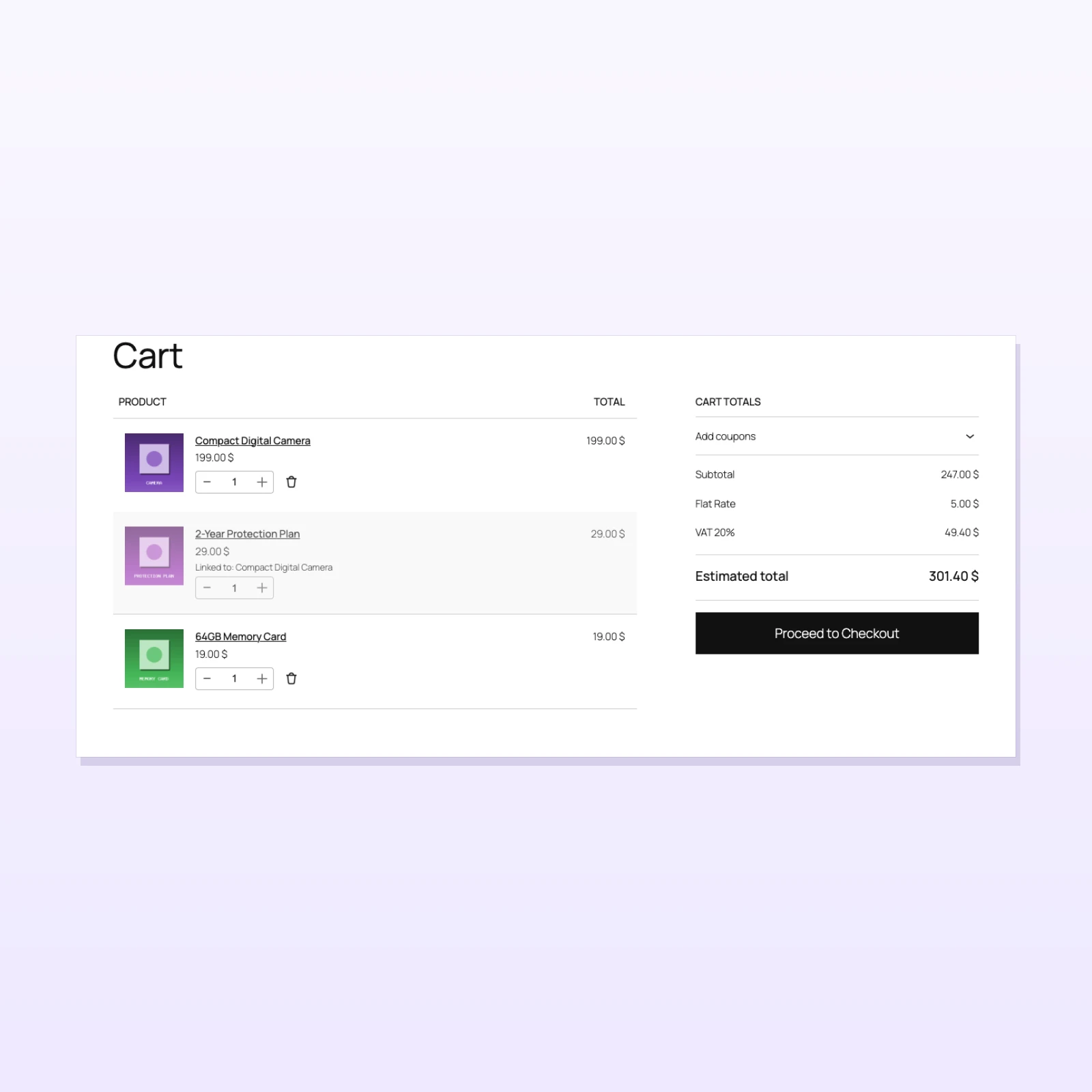
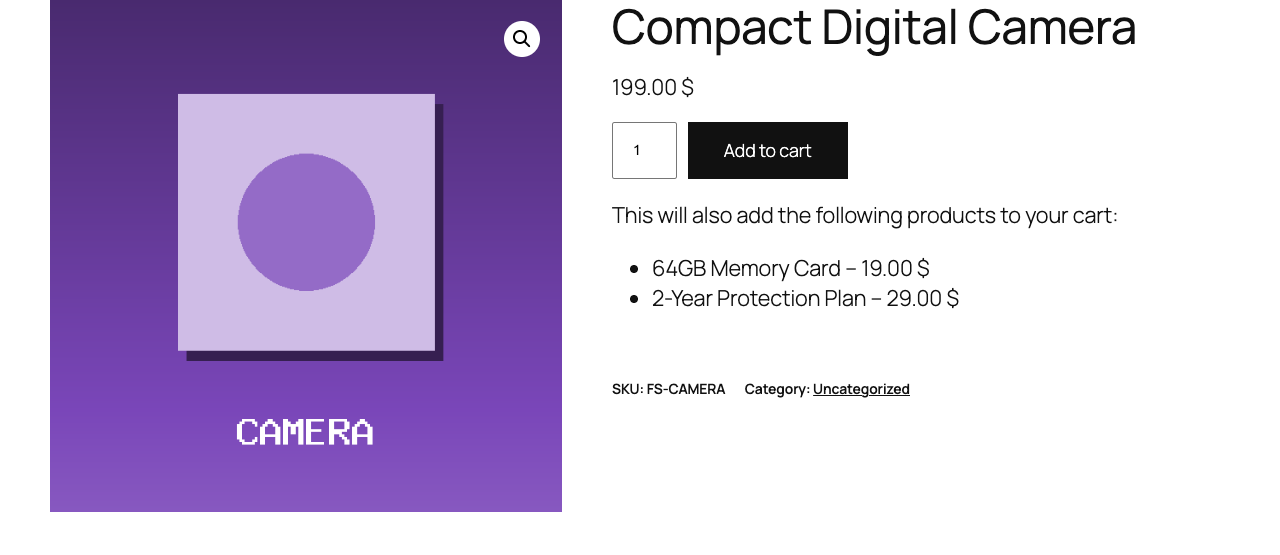
You attach force sell products to a parent product in the plugin settings. When a shopper adds the parent to the cart, the plugin adds the configured products as synced force sell items, each carrying the cart item key of the parent product that forced it. The storefront message tells the customer directly: 'This will also add the following products to your cart:'.
Because each forced item keeps a reference to its parent, the plugin tracks which products were added automatically and which came from the shopper's own choices. The settings screen exposes these records as synced force sell product ids for the cart item, so the connection between parent and companion stays visible in the cart data.
What the Force Sells settings screen shows you
The product search field ('Search for a product…') is where you pick the products to attach. Each cart item entry reports whether it is a synced force sell and lists the synced force sell product ids for that item, alongside the parent's cart item key.
Diagnostics are built into the same interface. The plugin documents the actions and filters it exposes, returns plugin information on request, and reports standard error states such as invalid request, invalid parameter, resource not found and internal server error. Logging accepts a log level, a log message and optional context, with validation for a missing log level, an invalid log level and a missing log message.
Onboarding and plugin information in the admin
An onboarding status is stored with the current onboarding step, the current onboarding progress and the onboarding persona, plus the onboarded version and the last updated date. The plugin information endpoint returns the documented actions and filters, and you can narrow that response to actions only or filters only.
Compatibility is part of the design: the addon is built to work with a variety of other WooCommerce extensions and with many popular WordPress themes, so product recommendations display correctly without affecting your site's design.
What this build includes
| Attach force sell products to a parent | Search for a product in the settings screen and add it to the list of products that follow the parent into the cart. |
|---|---|
| Automatic cart addition | When the parent product is added, the configured companion products are added too, shown to the shopper with a short explanatory line. |
| Parent tracking per cart item | Each forced item stores the cart item key of the parent that forced it, so the link between the two stays readable in cart data. |
| Synced force sell ids | The settings interface lists the synced force sell product ids for a cart item and flags whether that item is a synced force sell. |
| Documented hooks browser | Retrieve the actions and filters the plugin documents, filtered to actions only or filters only when you need a narrower view. |
| Logging with level and context | Write log entries with a required level and message plus optional context, with validation messages for missing or invalid values. |
| Onboarding state tracking | Record the onboarding status, current step, progress, persona, onboarded version and the date it was last updated. |
| Extension and theme compatibility | Designed to work with a variety of WooCommerce extensions and many popular WordPress themes without disturbing your site's design. |
Installing it on a WordPress site
- Upload the plugin zip through Plugins → Add New → Upload Plugin, or place the extracted folder in wp-content/plugins.
- Activate Force Sells for WooCommerce on a site running WordPress 6.0 or later and PHP 7.4 or later.
- Open a product, search for the products to force sell, and save; then add the parent product to the cart to confirm the companions appear.
Latest changes
This package is version 2.0.6 of Force Sells for WooCommerce.
Frequently asked questions
What does Force Sells for WooCommerce actually do?
It combines products in a single cart. You recommend additional products to customers during checkout by attaching them to a parent product; when that parent is added, the configured products join the same cart item group, which helps increase average order value and improve the shopping experience.
Will it conflict with my other WooCommerce extensions?
The addon is designed to work with a variety of other WooCommerce extensions, so you can extend store functionality without conflicts. It is also compatible with many popular WordPress themes, keeping recommendation output correct without changing your site's design.
Is this the developer's build, and what about updates and support?
You receive the same plugin files the developer ships, distributed as a GPL build for $4.49. There is no vendor update channel and no vendor support desk with this purchase; updates are not provided by the vendor through this listing.
What are the server requirements?
The plugin requires WordPress 6.0 or later and PHP 7.4 or later, and is tested up to WordPress 7.1.3. The download is a 1.9 MB zip at version 2.0.6.
Can I see which products were added automatically?
Yes. Cart items expose a synced force sell flag, the synced force sell product ids for the item, and the cart item key of the parent product that forced it, so automatic additions stay distinguishable from the shopper's own selections.
What the GPL build means for you
This is the same archive the developer publishes, redistributed under the GNU General Public License: you get the working files for $4.49 with no vendor update channel and no vendor support desk. If you need automatic updates or a support contract, buy the official license from the developer.
| This GPL build | Official license | |
|---|---|---|
| Price | $4.49 one time | Vendor subscription |
| Automatic updates | No | Yes |
| Developer support | No | Yes |
| Number of sites | Unlimited | Depends on plan |
Browse the rest of the WordPress plugins category or the full shop. The licence text is at GNU GPL v2, and general documentation is at WordPress.org.
You must be logged in to post a review.
You may also like…

Related products







Reviews
Clear filtersThere are no reviews yet.