

YITH Booking and Appointment for WooCommerce Premium GPL
$4.49
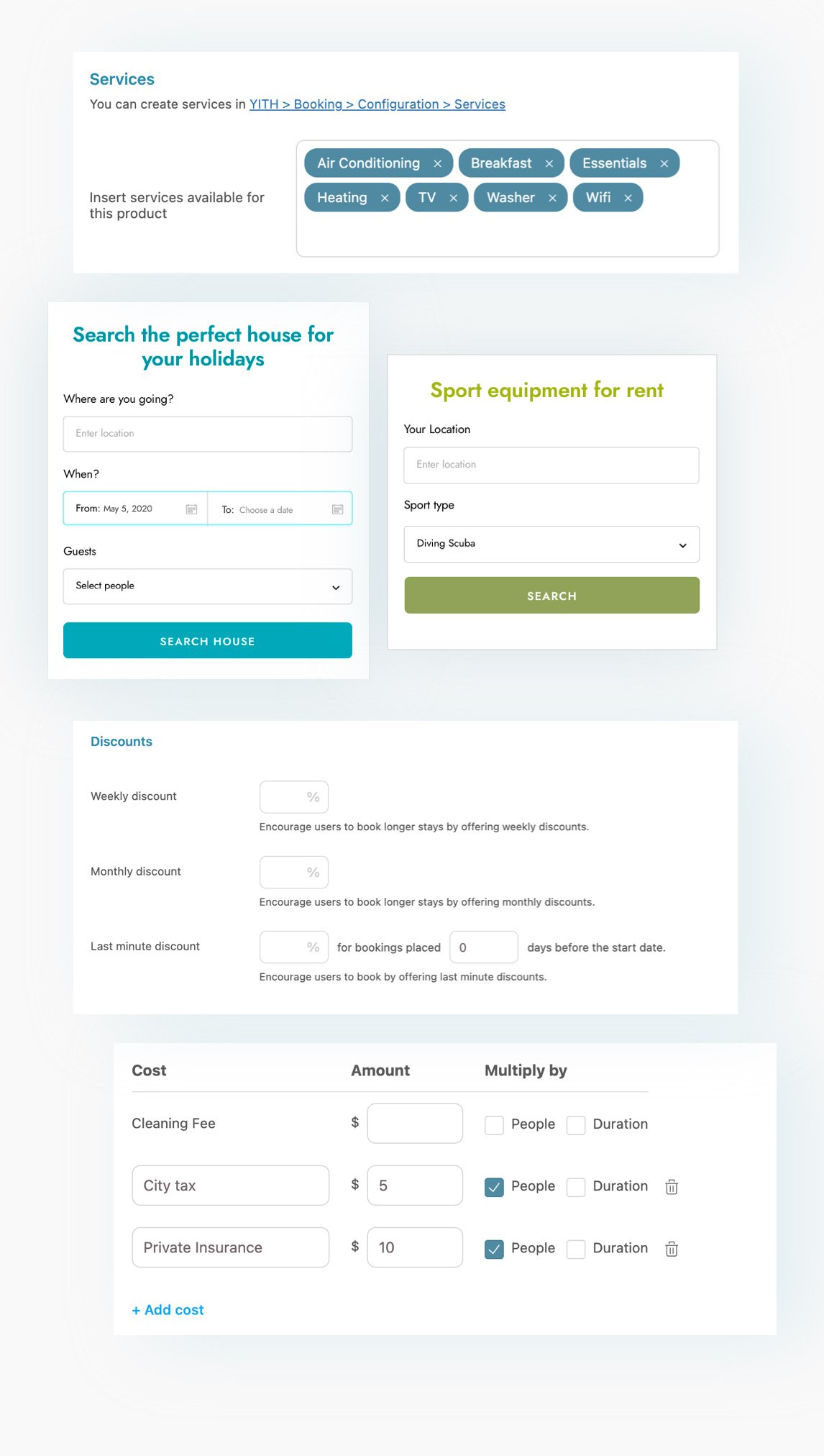
YITH Booking and Appointment for WooCommerce Premium is a WooCommerce plugin for selling products and services that customers book by date and time.
YITH Booking and Appointment for WooCommerce Premium is a WooCommerce plugin for selling products and services that customers book by date and time. It adds a booking management area to your store, where you create bookings, filter them by date and configure the email notifications sent for each one. A Google Calendar sync runs in the background to keep your bookable products aligned with your calendar. The build sold here is version 5.25.0, a 5.1 MB zip.
| Product | YITH Booking and Appointment for WooCommerce Premium |
|---|---|
| Version | 5.25.0 |
| Works with | WordPress 6.x+ / PHP 8.x+ |
| Tested up to | WordPress current |
| License | GPLv2 or later |
| Delivery | Instant ZIP download, 10 downloads, 365 days |
What can I manage from the booking actions screen?
The plugin adds a booking management area with its own actions. From there you create a booking, save it, and filter the list by date. The list shows upcoming bookings and tells you when you have no new bookings for now, with a note that upcoming bookings will appear there.
Existing bookings can be edited and updated, and the booking list supports deletion. Before a record is removed, the interface warns that the action cannot be undone and the data cannot be recovered. Access to creating bookings is controlled by permissions, so users without the right permission see a message instead of the booking form.
How does Google Calendar sync work with bookable products?
Bookable products are synchronized with Google Calendar in the background. The plugin shows a notice explaining that the synchronization is running and that it will take a few minutes, and the notice disappears when the process completes. When it finishes, a second message confirms that synchronization completed.
This keeps the calendar side of your booking operation updated without a manual export step. The sync notice appears in the plugin screens, so you can tell when a run is in progress and when it is done.
Which page-builder and WooCommerce extensions does it work with?
The plugin is compatible with WooCommerce Subscriptions, so recurring bookings can be managed alongside one-off appointments. It also works with Elementor, which lets you design custom booking pages with the Elementor page builder.
Version 5.25.0 adds support for WooCommerce 10.1. Earlier releases in the same line added support for WooCommerce 10.0 and 9.9, so the plugin tracks recent WooCommerce versions as they ship.
What do the booking blocks show when there is nothing to list?
The plugin ships blocks for displaying bookable products, including a product selection block and a category-based block. Each has its own empty state: you are prompted to select products in the block settings, or told that there are no bookable products in the categories you selected.
Other states cover a store with no bookable products at all, a missing search form selection, and a request to select a bookable product before continuing. These messages tell you which setting to fix rather than leaving a blank block on the page.
What this build includes
| Create and edit bookings | Create bookings from the WordPress admin, save them, and update existing records from the same booking actions area. |
|---|---|
| Filter bookings by date | Narrow the booking list to a chosen date range and see a dedicated message when no bookings match the selected filters. |
| Google Calendar synchronization | Bookable products are synchronized with Google Calendar in the background, with notices showing when the run starts and completes. |
| Email notification settings | Manage and configure the email notifications for your bookings from the plugin settings, including the WooCommerce Email Preview fix added in 5.25.0. |
| Bookable product blocks | Place blocks that list bookable products by selection or by category, with clear messages when the selected products or categories return nothing. |
| Elementor page building | Design custom booking pages with Elementor, since the plugin works with the Elementor page builder. |
| WooCommerce Subscriptions support | Manage recurring bookings effectively thanks to compatibility with WooCommerce Subscriptions. |
| Deposits and Down Payments integration | Balance orders calculate the correct notification date and expiration date, both fixed in recent 5.x releases. |
Installing it on a WordPress site
- Upload the plugin zip through the Plugins section of your WordPress dashboard and activate it.
- Open the plugin settings and configure your booking options, then customize the booking forms to match your products.
- Add or edit a bookable product, place the booking blocks where you need them, and let the Google Calendar sync run until the completion notice appears.
Frequently asked questions
Is this the same plugin file the developer ships?
Yes. The zip contains the same plugin files as the developer release, distributed under GPL. There is no vendor update channel and no vendor support desk with this build. The price here is $4.49.
Can I take recurring bookings with WooCommerce Subscriptions?
Yes. The plugin is compatible with WooCommerce Subscriptions, which allows you to manage recurring bookings effectively alongside standard one-off appointments in the same store.
Does it work with Elementor?
Yes. YITH Booking and Appointment for WooCommerce Premium works with Elementor, so you can design custom booking pages using the Elementor page builder instead of relying on the default templates.
Which WooCommerce version does version 5.25.0 support?
Version 5.25.0, released on 19 August 2025, adds support for WooCommerce 10.1. The two releases before it added support for WooCommerce 10.0 and 9.9 respectively.
What happens if a user without permission opens the booking screen?
They see a message stating they do not have permissions to create bookings, and the booking form is not available to them. Access to booking creation is therefore controlled by WordPress user permissions.
What the GPL build means for you
This is the same archive the developer publishes, redistributed under the GNU General Public License: you get the working files for $4.49 with no vendor update channel and no vendor support desk. If you need automatic updates or a support contract, buy the official license from the developer.
| This GPL build | Official license | |
|---|---|---|
| Price | $4.49 one time | Vendor subscription |
| Automatic updates | No | Yes |
| Developer support | No | Yes |
| Number of sites | Unlimited | Depends on plan |
Browse the rest of the WordPress plugins category or the full shop. The licence text is at GNU GPL v2, and general documentation is at WordPress.org.
You must be logged in to post a review.
You may also like…

Related products




Reviews
Clear filtersThere are no reviews yet.