

Wpbakery Page Builder For WordPress Visual Composer GPL
$4.49
WPBakery Page Builder for WordPress (Visual Composer) is a drag-and-drop page builder plugin that lets you create custom page layouts and designs through a visual interface, without writing code.
WPBakery Page Builder for WordPress (Visual Composer) is a drag-and-drop page builder plugin that lets you create custom page layouts and designs through a visual interface, without writing code. You add content blocks, arrange columns and style elements directly from the page editor. This GPL build ships the same plugin files the developer releases, with no vendor update channel and no vendor support desk, for $4.49 at digitumb.com.
| Product | wpbakery-page-builder-for-wordpress-visual-composer |
|---|---|
| Version | 9.2 |
| Works with | WordPress 6.x+ / PHP 8.x+ |
| Tested up to | WordPress current |
| License | GPLv2 or later |
| Delivery | Instant ZIP download, 10 downloads, 365 days |
How WPBakery Page Builder builds a page layout
The plugin works inside the WordPress page editor. Once active, you open the builder from the editor and place content elements on the page, then arrange them into a layout. Rows are split into columns using the column presets the builder shows, from 1 column – 1/12 up to the full-width options, so a page can mix narrow and wide sections without touching template files.
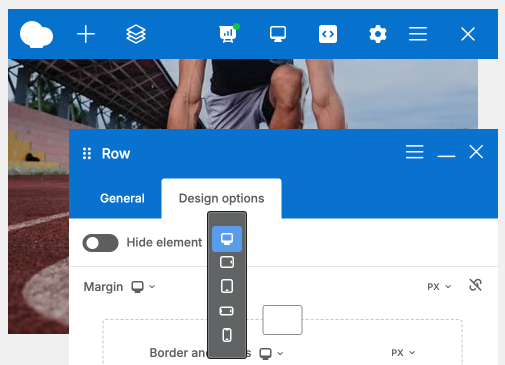
Design Options are available on the elements themselves. Background color, custom text color, a color schema and text alignment can be set per block, and an Extra class name field lets you attach your own class to an element. Content elements can also be placed inside an inner column when a section needs nested structure.
Call to Action and pricing table blocks in the builder
The Call to Action element is built to catch visitors' attention with a CTA block. Its settings cover a heading line and subheading line, optional custom font and Google fonts, text alignment, call to action shape and display style, background and text colors, a color schema, and a width given as a percentage. You can add a button and an icon to the block, and choose whether the icon sits on the element border.
A separate pricing table element outputs a pricing table on your page. Its fields take a price currency, a price and a price action period, so a plan row can be assembled from the builder rather than a separate table plugin. List markers inside such blocks can be given a custom color.
Where WPBakery Page Builder fits with WooCommerce and Elementor
WooCommerce compatibility is included, which means custom product pages and shop layouts can be built with the same drag-and-drop editor used for regular pages. The builder is a standalone plugin and is not directly compatible with Elementor; both can run on the same WordPress site, but they will not work together on the same page, so a given page should be built with one of them.
The plugin package contains the include, config, modules and locale folders, and the download is a 6.7 MB zip at version 9.2.
What this build includes
| Drag-and-drop layout editing | Create custom page layouts and designs through a visual drag-and-drop interface in the WordPress page editor, with no coding skills required. |
|---|---|
| Column presets | Divide rows into columns using the builder's presets, from 1 column – 1/12 through to wider splits, to compose multi-section pages. |
| Call to Action element | Build a CTA block with heading and subheading lines, alignment, shape and display style, background and text colors, plus an optional button and icon. |
| Pricing table output | Place a pricing table on a page by entering a price currency, a price and a price action period in the element settings. |
| Design Options per element | Set a custom background color, custom text color, color schema and Extra class name on individual elements to control how each block looks. |
| WooCommerce layouts | Build custom product pages and shop layouts with the builder, since the plugin is compatible with WooCommerce. |
| Font and Google fonts options | Enable a custom font option and Google fonts on text elements such as the Call to Action block to change how headings and subheadings render. |
Installing it on a WordPress site
- Download the zip from digitumb.com and keep it somewhere you can find it.
- In your WordPress dashboard, go to Plugins and upload the downloaded plugin file, then run the install.
- Activate the plugin, open a page in the editor and start the builder to create your custom layout.
Frequently asked questions
Do I need coding skills to use WPBakery Page Builder?
No. The plugin creates custom page layouts and designs through a visual drag-and-drop interface, so you place elements and arrange columns on the page instead of writing markup or template code. Design Options on each element handle colors, alignment and classes.
Can I use WPBakery Page Builder and Elementor on the same site?
Yes, both plugins can be used on the same WordPress site. They will not work together on the same page, though, because WPBakery Page Builder is a standalone plugin and is not directly compatible with Elementor. Build each page with one builder.
Does it work with WooCommerce product pages?
Yes. WPBakery Page Builder is compatible with WooCommerce, so you can create custom product pages and shop layouts with the same drag-and-drop editor. The CTA and pricing table elements are also available for use on those layouts.
What does the $4.49 GPL build include?
You get the same plugin files the developer ships, version 9.2, as a 6.7 MB zip containing the include, config, modules and locale folders. The GPL build comes with no vendor update channel and no vendor support desk; the price at digitumb.com is $4.49.
What the GPL build means for you
This is the same archive the developer publishes, redistributed under the GNU General Public License: you get the working files for $4.49 with no vendor update channel and no vendor support desk. If you need automatic updates or a support contract, buy the official license from the developer.
| This GPL build | Official license | |
|---|---|---|
| Price | $4.49 one time | Vendor subscription |
| Automatic updates | No | Yes |
| Developer support | No | Yes |
| Number of sites | Unlimited | Depends on plan |
Browse the rest of the WordPress plugins category or the full shop. The licence text is at GNU GPL v2, and general documentation is at WordPress.org.
You must be logged in to post a review.
You may also like…

Related products






Reviews
Clear filtersThere are no reviews yet.