

Bookshop Storefront Woocommerce Theme GPL
$4.49
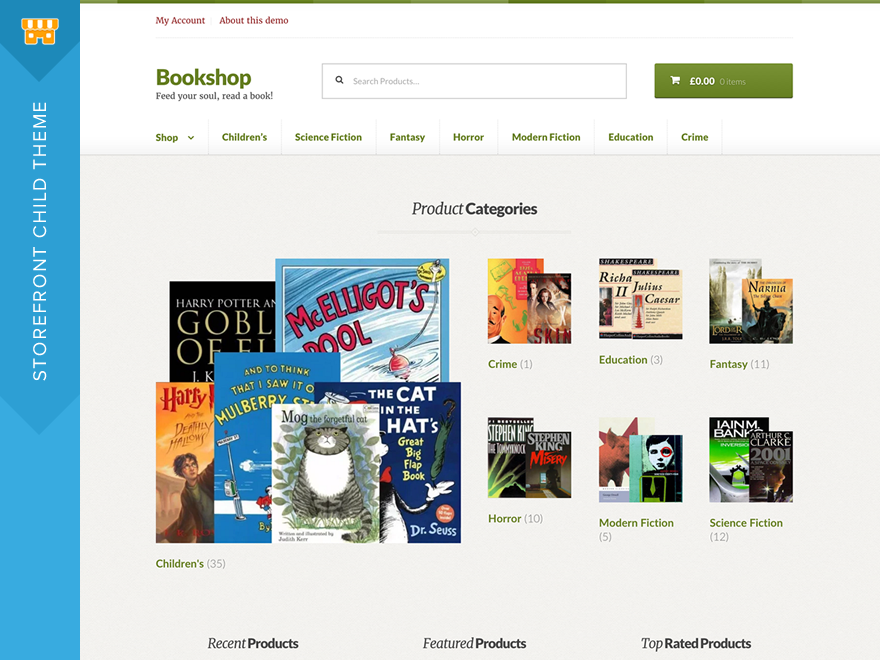
Bookshop is a Storefront child theme built for book shops that sell through WooCommerce. It keeps the familiar Storefront base and adds a traditional bookstore layout, with settings handled through.
Bookshop is a Storefront child theme built for book shops that sell through WooCommerce. It keeps the familiar Storefront base and adds a traditional bookstore layout, with settings handled through the WordPress Customizer. The package is a GPL build: the same theme files the developer ships, with no vendor update channel and no vendor support desk, priced at $4.49.
| Product | Bookshop |
|---|---|
| Version | 1.0.20 |
| Works with | WordPress 6.x+ / PHP 8.x+ |
| Tested up to | WordPress current |
| License | GPLv2 or later |
| Delivery | Instant ZIP download, 10 downloads, 365 days |
What Bookshop adds on top of Storefront
Bookshop is a child theme, so it runs on top of the Storefront parent theme rather than replacing it. Its own description calls it a traditionally designed Storefront child theme for book shops, which tells you the visual direction: a classic bookstore look rather than a generic shop layout.
Because it is a child theme, the theme's job is the presentation layer. The store itself is WooCommerce, and the theme's settings live in the WordPress Customizer, where you adjust the branding for your bookstore.
Running a bookstore catalogue with WooCommerce
The theme is made for creating and managing an online bookstore, with customizable layouts and integrated eCommerce functionality. Products, categories and checkout come from WooCommerce; Bookshop provides the storefront styling around them.
Compatibility with the latest version of WooCommerce is stated by the developer, so the eCommerce functions are expected to work smoothly with current WooCommerce releases. If you already run a Storefront shop, the switch is a child theme activation rather than a rebuild.
Customizer setup and page builder layouts
Branding changes happen through the WordPress Customizer after activation. That is where you fit the theme to your bookstore's colours and identity without editing template files.
Bookshop also works with popular page builders, including Elementor, so you can compose unique layouts for landing pages and category pages alongside the theme's own templates.
How the GPL build is supplied
You receive the same theme files the developer ships, packaged as a GPL build. There is no vendor update channel attached and no vendor support desk; updates and help come from wherever you normally get them for GPL builds.
The download is a 0.7 MB zip at version 1.0.20, priced at $4.49. Unlimited domains are covered by the store's terms for this build.
What this build includes
| Storefront child theme structure | Installs as a child theme on top of Storefront, so the bookstore styling sits over the existing parent theme instead of replacing it. |
|---|---|
| Traditional book shop design | Ships a traditionally designed layout aimed at book shops, giving the store a classic bookstore presentation rather than a generic shop look. |
| WooCommerce storefront | Provides the storefront for an online bookstore with integrated eCommerce functionality, with compatibility stated for the latest WooCommerce version. |
| Customizer-based settings | Lets you adjust the theme through the WordPress Customizer after activation, fitting the layout to your bookstore's branding. |
| Elementor and page builder support | Works with popular page builders including Elementor, so you can build unique page layouts on top of the theme's templates. |
| Customizable layouts | Offers customizable layouts for the bookstore, letting you arrange how the shop presents its catalogue and pages. |
Installing it on a WordPress site
- Upload the Bookshop theme zip through the WordPress dashboard.
- Activate the theme; it runs as a child theme on top of Storefront.
- Open the WordPress Customizer and adjust the settings to fit your bookstore's branding.
Frequently asked questions
Do I need the Storefront parent theme installed?
Yes. Bookshop is a Storefront child theme, so Storefront needs to be present for the child theme to work. Install and keep the parent theme in place, then activate Bookshop on top of it and make your changes through the Customizer.
Does Bookshop work with the current WooCommerce release?
The developer states that the theme is fully compatible with the latest version of WooCommerce, so the eCommerce functions are expected to run smoothly. Keep WooCommerce updated as you normally would and test your checkout after any major WooCommerce update.
Can I build custom pages with Elementor?
Yes. Bookshop is compatible with popular page builders, including Elementor, which lets you create unique layouts for pages beyond the theme's own templates. You can mix builder-made pages with the theme's bookstore styling.
How do I set up Bookshop on my WordPress site?
Upload the theme file through the WordPress dashboard, activate it, and customize your settings through the WordPress Customizer to fit your bookstore's branding. No template editing is required for the standard setup.
What do I get with the $4.49 GPL build?
You get the same theme files the developer ships, as a GPL build, with no vendor update channel and no vendor support desk. The download is a 0.7 MB zip at version 1.0.20, and the price is $4.49.
What the GPL build means for you
This is the same archive the developer publishes, redistributed under the GNU General Public License: you get the working files for $4.49 with no vendor update channel and no vendor support desk. If you need automatic updates or a support contract, buy the official license from the developer.
| This GPL build | Official license | |
|---|---|---|
| Price | $4.49 one time | Vendor subscription |
| Automatic updates | No | Yes |
| Developer support | No | Yes |
| Number of sites | Unlimited | Depends on plan |
Browse the rest of the WordPress themes category or the full shop. The licence text is at GNU GPL v2, and general documentation is at WordPress.org.
You must be logged in to post a review.
You may also like…

Related products







Reviews
Clear filtersThere are no reviews yet.