
Paperback WordPress Theme Array Themes GPL
$4.49
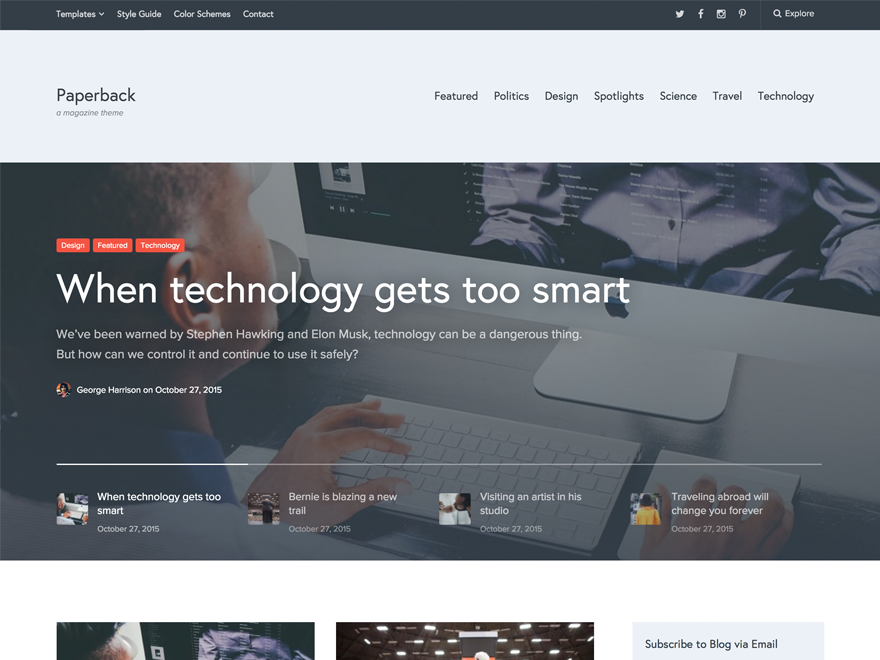
Paperback WordPress Theme is a magazine-style theme for WordPress that lets you build photography-driven photo series and immersive stories using images, galleries, video and audio. A featured post.
Paperback WordPress Theme is a magazine-style theme for WordPress that lets you build photography-driven photo series and immersive stories using images, galleries, video and audio. A featured post carousel and a category mega menu help readers find and move through your content. The layout keeps written content clean and organized, which suits bloggers, writers and photographers publishing long-form or visual posts.
| Product | Paperback WordPress Theme |
|---|---|
| Version | 1.8.1 |
| Works with | WordPress 4.0+ / PHP 8.x+ |
| Tested up to | WordPress 4.7.4 |
| License | GPLv2 or later |
| Delivery | Instant ZIP download, 10 downloads, 365 days |
What can you publish with Paperback?
Paperback is built around immersive content. You can assemble photo series and stories that mix images, galleries, video and audio in one post, so a single article can carry both text and media without switching themes. The magazine-style layout is designed to make that content engaging and discoverable.
The theme also keeps written content clean and organized, which the vendor positions as ideal for bloggers and writers. A featured post carousel puts selected articles in front of readers, and a category mega menu gives your sections a structured navigation layer.
How does Paperback work with page builders and WooCommerce?
Paperback is compatible with popular page builders such as Elementor and Beaver Builder, so you can customize layouts further than the theme's own templates. You can start customizing your site immediately after activation.
The theme is also designed to work with WooCommerce, which means you can run an online store alongside a blog or content site on the same install. Both capabilities come from the theme vendor's own description of the product.
Which plugin and widget areas does the theme provide?
The theme includes a required plugins installer. Its screens let you install, update and activate plugins, and they report when a plugin needs an update to stay compatible with the theme, showing installed, minimum required and available versions. Messages cover success, dismissal and the case where no plugins were selected.
Widget areas are defined for the sidebar of posts and pages and for the footer. Menu locations cover a secondary menu and a social icon menu, and the theme includes comment navigation with older and newer comment links plus a page-not-found template.
What this build includes
| Photo series and story layouts | Build photography-driven photo series and immersive stories that combine images, galleries, video and audio in a single piece of content. |
|---|---|
| Featured post carousel | Highlight selected posts in a carousel so readers can discover featured articles directly from the theme's magazine-style layout. |
| Category mega menu | Organize sections with a category mega menu that makes your content categories easier to browse and discover. |
| Page builder compatibility | Customize layouts with popular page builders such as Elementor and Beaver Builder on top of the theme's own templates. |
| WooCommerce support | Run an online store alongside your blog or content site, since the theme is designed to work with WooCommerce. |
| Required plugins installer | Install, update and activate required plugins from the theme's installer screens, including compatibility notices and version details. |
| Sidebar and footer widget areas | Place widgets in a sidebar for posts and pages and in a footer area defined by the theme. |
| Menu and comment navigation | Use a secondary menu and a social icon menu location, plus older and newer comment navigation links. |
Installing it on a WordPress site
- Sign in to your WordPress dashboard, go to Appearance > Themes and click Add New.
- Click Upload, choose the theme zip file you downloaded from Digitumb, then click Install Now.
- After WordPress installs the theme, click Activate, then go to Appearance > Getting Started to set it up.
Latest changes
Version 1.8.1 is the build offered here, delivered as a 1.1 MB zip.
Frequently asked questions
Is this the same theme file the developer ships?
Yes. This is a GPL build containing the same files as the developer ships, offered at $4.49. It does not include a vendor update channel or a vendor support desk, so updates and help come from the WordPress community rather than from Array Themes.
What WordPress version does Paperback require?
The theme requires WordPress 4.0 and is tested up to WordPress 4.7.4. Check that your install meets the minimum before uploading the zip file through Appearance > Themes.
Can I use Paperback with Elementor or Beaver Builder?
Yes. The theme is compatible with popular page builders such as Elementor and Beaver Builder, which lets you customize layouts beyond the theme's default templates. You can begin customizing right after activation.
Does Paperback work with WooCommerce?
Yes. The theme is designed to work with WooCommerce, so you can add an online store alongside your blog or content site. The store and the content site share the same theme.
Where do I get help if something goes wrong?
The theme's own documentation points to the Array Themes support forum. Because this is a GPL build without a vendor support desk, plan on community resources and the WordPress documentation when you need assistance.
What the GPL build means for you
This is the same archive the developer publishes, redistributed under the GNU General Public License: you get the working files for $4.49 with no vendor update channel and no vendor support desk. If you need automatic updates or a support contract, buy the official license from the developer.
| This GPL build | Official license | |
|---|---|---|
| Price | $4.49 one time | Vendor subscription |
| Automatic updates | No | Yes |
| Developer support | No | Yes |
| Number of sites | Unlimited | Depends on plan |
Browse the rest of the WordPress themes category or the full shop. The licence text is at GNU GPL v2, and general documentation is at WordPress.org.
You must be logged in to post a review.
You may also like…

Related products




Reviews
Clear filtersThere are no reviews yet.